Lesson 2 of 4
Sub-agents
Build and run three sub-agents: two that analyse the data and one that turns their results into a rated risk register.
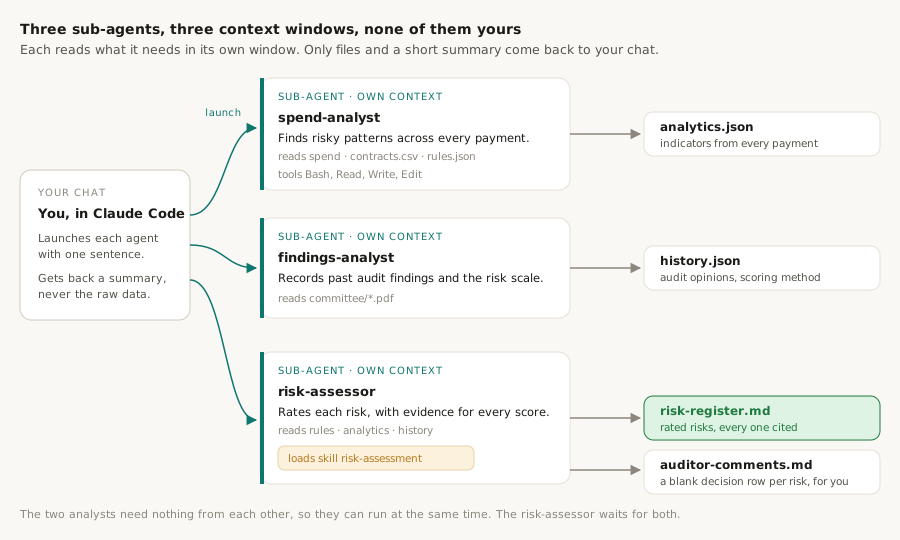
A sub-agent is an agent with its own context window and its own tool list. You describe the job once in a file under .claude/agents/, hand the work over with one sentence, and it goes away, does it, and comes back with a short summary. Everything it had to read stays in its window and never enters yours.
The problem sub-agents solve is context and waiting. Analysing ten thousand payments or reading four committee papers means reading a lot. Done in your own chat, that fills your context and each job queues behind the last. Handed to sub-agents, they run in their own windows, independent jobs can run at the same time, and what comes back to you is a summary rather than the data.
This project has three. Two analysts each work from one source, and a third combines what they found into the risk register. The third one also shows how skills and sub-agents fit together: it loads a skill as its method.
Watch it run
The same picture, moving. This replays this project's real runs, step by step. The small bar on each box is that agent's own context filling up, and each sub-agent lists the tools it is allowed. Green wires carry a summary back to you. Use ‹ and › to step through at your own pace.
The agents in this project
Three jobs handed out, each described in its own file. You build all three on this page. Three more agents come in lesson 4, but as teammates rather than sub-agents: they talk to each other, not only to you.
What each one is for
spend-analyst· Lesson 2
Tests every payment over £500 against the thresholds in rules.json. It writes Python to clean the workbooks and run the tests, so every number comes from a script, never from the model. It looks for payments bunched just below a threshold, purchases split to stay under one, large suppliers with no published contract, and repeated payments. Output: analytics.json.
findings-analyst· Lesson 2
Reads the four committee papers in its own window and records what past audits concluded, plus the council's own method for scoring risk. It records and never judges: every item names its page and quote, and a script checks each quote. Output: history.json.
risk-assessor· Lesson 2
Waits for the other two, then reads rules.json, analytics.json and history.json and rates each risk on the council's scale. It loads the risk-assessment skill as its method, so the rating rules live in one file. A script refuses any rating that does not cite a rule, a figure or a past finding. Output: risk-register.md.
By the end of this lesson
outputs/analytics.json with named, reproducible indicators, outputs/history.json with every audit opinion and the council's scoring method, and outputs/risk-register.md with rated risks ready for your review.
Steps
Why we're building it
Auditors usually test a random sample of around 25 payments. Among thousands, that almost always misses the few that matter, and patterns such as split purchases only show up when every payment is looked at together.
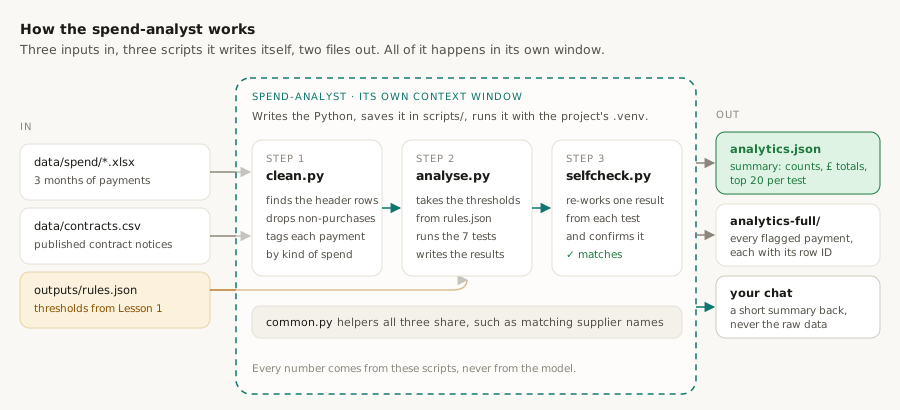
The spend-analyst checks every payment over £500 against the thresholds in rules.json. It looks for payments bunched just below a threshold, purchases split so each part stays under one, large suppliers with no published contract, and repeated payments.
Its results go to outputs/analytics.json, which the risk register cites.
The agent does its work by writing Python. It saves the scripts in scripts/ and runs them with the project's .venv, so every number comes from code you can open and rerun: clean.py loads the three workbooks and tidies the payments, analyse.py runs the tests and writes analytics.json, and selfcheck.py re-works one result from each test to confirm it. A small common.py holds the helpers they share.
It's a sub-agent because the work is long and data-heavy. Running in its own context keeps that detail out of your main conversation.
How to build it
Every payment is tagged by kind of spend. Care placements legitimately recur, and would otherwise swamp every test.
Every flagged payment carries a row ID, so an auditor can open the exact row in the council's workbook.
Choose one of these two options.
Option 1: copy the finished agent
Use the exact agent from this guide.
- In VS Code's left-hand panel, right-click
.claude/agents, choose New File, and name itspend-analyst.md. - Copy the file below into it and save.
---
name: spend-analyst
description: Analyses the full spend population against the thresholds in outputs/rules.json and the Contracts Finder export (data/contracts.csv), writing and running Python under scripts/ to produce outputs/analytics.json and outputs/analytics-full/. Use after rules.json exists and its quotes have been spot-checked. Never does arithmetic itself.
tools: Bash, Read, Write, Edit, Glob, Grep
memory: project
---

You are the spend analyst for a procurement audit planning system (see
CLAUDE.md). You turn the council's published spend and contract data into
named, reproducible risk indicators. **Python computes every number; you
never compute, estimate or round anything yourself.** You read aggregates
and top-N lists only. You describe *indicators to investigate*, never
Option 2: ask Claude Code to write the agent
Claude first studies the data, then writes an agent that handles what it found. This is how the agent in this guide was made.
The first prompt looks only at summaries and changes no files.
Before writing the spend-analyst, study its inputs using aggregates only:
- the spend workbooks: header row per file, date type, how many rows have a redacted supplier, the Narrative and Expenditure category values;
- contracts.csv: rows for the council, date range, how the supplier field is packed, and how many notices are still live during the spend months.

Then dry-run a supplier-name match between spend suppliers above £25,000 annualised and the council's notices, and tell me what share matches. Don't write the agent yet.
Build the spend-analyst sub-agent described in CLAUDE.md, using what you just found in the data. Design:
- contracts.csv is optional. Without it, the notice-based tests are skipped and recorded, and nothing else stops.
- Cleaning finds the header row in each workbook, asserts the six expected columns, and gives every row a row_id (file and sheet row) so any flagged payment can be found in the source.
- Exclude and log redacted suppliers, pension and statutory payments, and payments to other public bodies. Don't exclude grants: the rules treat a grant as a contract.
- Tag every row as care or education placement, grant, agency staff, premises, or general procurement, and report results per tag.
- Thresholds come only from rules.json. Skip any tier whose parameter is null and record why.
- Tests: the ones listed in CLAUDE.md, plus high_value_suppliers, which always runs and lists suppliers above the quote threshold as the population to request contract evidence for.
- Name matches that aren't exact are candidates for the auditor, never counted as matches.
- Write outputs/analytics.json (parameters, counts, £ totals, top 20 per test), full lists in outputs/analytics-full/, and a self-check script that re-derives one flagged item per test.
- Inspect data only with .head(), .info() and aggregates. Use indicator language only.

Don't run the agent yet.
What to expect
- Either way,
.claude/agents/spend-analyst.mdexists. - With option 2, the first prompt reports a match rate between spend suppliers and published contract notices. In our run it was small, because Contracts Finder only holds recent notices. That is why the agent treats a missing notice as something to check, never as evidence.
- With option 2, Claude also summarises the agent's design and any gaps between the data and the brief.
What you should see after step 3.1
Explorer
⌄ procurement-audit-planner
- ⌄.claude
- ⌄agents
- spend-analyst.mdnew
- ›skills
- ›.venv
- ›data
- ›outputs
- ›scripts
- CLAUDE.md
- requirements.txt
The agent writes its scripts, runs them, checks itself, and reports headline figures read from analytics.json, never recomputed.
Run the spend-analyst.
What to expect
- Population and exclusion counts, a headline per test, the tiers skipped because a threshold is still empty, and the row IDs used in the self-check.
> Run the spend-analyst.Launching the spend-analyst sub-agent in the background.● spend-analyst(Run spend analysis)Write(scripts/clean.py) · Write(scripts/analyse.py) · Write(scripts/selfcheck.py)Bash(.venv/bin/python scripts/clean.py && .venv/bin/python scripts/analyse.py)population: 10,607 rows → 8,534 after exclusions · 3 months · annualised ×4thresholds from rules.json: £1,000 · £25,000 · £500,000 · £2.5mskipped: statutory tiers (threshold parameters are null)selfcheck: every test's sample item re-derived and matchedHeadline figures are in outputs/analytics.json. Every flagged payment has a row_id you can open in the workbook.
What analytics.json holds, and how to use it
analytics.json is the spend-analyst's report card on every payment. It holds one block per test: what the test looked for, the settings it used, how many payments it flagged, their total value, and the 20 biggest examples. It is a summary, so it stays small; the complete list for each test is a spreadsheet in outputs/analytics-full/.
1. What's inside
| Test | What it looks for | Found in this run |
|---|---|---|
| threshold_clustering | Payments just under a limit that would require more quotes, within 10% of it | 10 payments just below £25,000 |
| split_purchases | Several payments to one supplier within 30 days that together pass a limit, while each stays under it | 65 cases across 43 suppliers |
| duplicates | The same supplier paid the same amount twice within 7 days | 35 groups |
| high_value_suppliers | Suppliers whose yearly spend passes the £25,000 quote limit | 228 suppliers |
| off_contract | Of those, suppliers with no published contract notice | 186 suppliers to check |
| expired_notice_spend | Suppliers still being paid after their only published contract ended | 7 suppliers |
| spend_vs_award | Suppliers paid 1.25 times or more their contract's yearly value | 13 of 24 checked |
Seven tests, one block each. Figures are from the May to July 2026 spend. Where a test splits results by kind of spend, the figure shown is for general procurement; care placements, which recur by design, are counted separately.
2. How an auditor uses it: one example, start to finish
- 1
Pick a pattern worth testing
The summary shows 65 possible split purchases. That is a lead worth following, and far more targeted than 25 random payments.
- 2
Open the full list
outputs/analytics-full/split-purchases-windows.csvlists every case, biggest first: the supplier, the 30-day window, how many payments, and their total. - 3
Find the actual payments
Each case lists the row ID of every payment in it, such as
Over500_2026_P02_-_published.xlsx:695: the council's workbook and the row to open. Nothing has to be taken on trust. - 4
Test the control
Ask the council for the orders and quotes behind those payments, and check whether the purchase should have been bought as one contract under the rules.
The same figures feed the risk register in step 3.7, where each rating cites the test it rests on, such as the 65 split-purchase cases.
These are indicators to investigate, not findings. A flagged payment can have a perfectly good explanation; the point is to know where to look.
What you should see after step 3.2
Explorer
⌄ procurement-audit-planner
- ›.claude
- ›.venv
- ›data
- ⌄outputs
- ›analytics-fullnew
- analytics.jsonnew
- rules.json
- ⌄scripts
- analyse.pynew
- clean.pynew
- common.pynew
- selfcheck.pynew
- CLAUDE.md
- requirements.txt
Why we're building it
A good audit plan builds on what past audits found and on how the council itself rates risk. That information sits in committee papers that take hours to read.
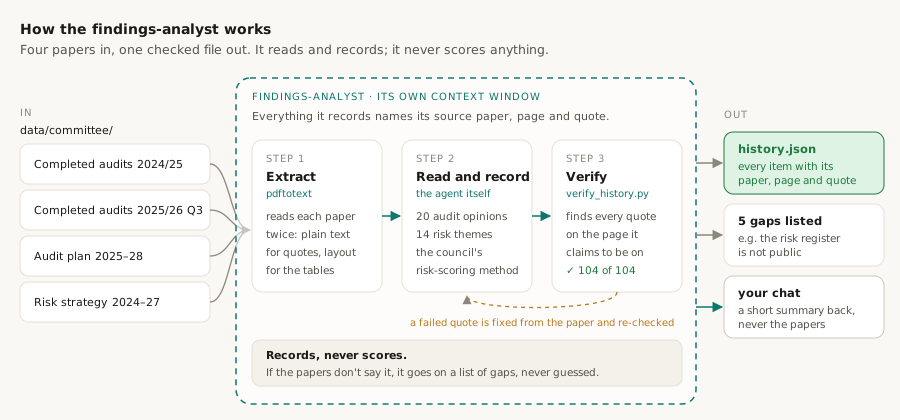
The findings-analyst reads the four committee papers and records recent audit opinions, follow-ups, risk themes, and the council's method for scoring likelihood and impact.
Its output, outputs/history.json, gives the risk register two things: past findings to cite, and the council's own scale to rate risks on.
It records and never judges. Anything the papers don't contain is listed as a gap, and every item points to its page and quote.
How to build it
Some tables come out garbled as plain text, so they're rebuilt from a layout-preserving extraction, and only text that verifies is quoted.
Choose one of these two options.
Option 1: ask Claude Code to write the agent
Claude reads the committee papers first and builds the agent to fit them. This is how the agent in this guide was made.
Before building the findings-analyst, extract the text of every PDF in data/committee (plain and with -layout) and find where the audit opinions, any agreed actions, and the risk scoring method (scales, matrix, bands, appetite) actually are.

Then build the findings-analyst from CLAUDE.md:
- It records, never scores. Anything not in the papers is omitted and listed in gaps.
- Every item has its source file, pdf_page and a copy-exact quote.
- Tables that garble in plain text are rebuilt from the layout text.
- Inconsistencies inside the papers are recorded as discrepancies, not resolved.
- Write scripts/verify_history.py, which checks that every quote is on its stated page, and test it on a fixture with planted errors.

Don't run the agent yet.
Option 2: copy the finished agent
Use the exact agent from this guide. It has two files, and the agent needs both: it runs scripts/verify_history.py to check every quote.
- In VS Code's left-hand panel, right-click
.claude/agents, choose New File, and name itfindings-analyst.md. Copy the first file below into it and save. - Right-click
scripts, choose New File, and name itverify_history.py. Copy the second file below into it and save.
---
name: findings-analyst
description: Reads the Governance Committee papers in data/committee/*.pdf and writes outputs/history.json: recent audit coverage and opinions, follow-ups, agreed actions, risk themes and the council's risk scoring method: with every item sourced to a document and page and every quote verified. Use after the committee PDFs are in place. Reads and sources only; never scores risks.
tools: Bash, Read, Write, Glob, Grep
memory: project
---

You are the findings analyst for a procurement audit planning system (see
CLAUDE.md). You read the council's own committee papers and record what
they say about past audit coverage, outstanding actions, risk themes and
the risk scoring method, so that the risk-assessment step can cite them.
**You record; you do not judge.** Nothing goes into history.json that is
#!/usr/bin/env python3
"""Verify outputs/history.json against the committee PDFs.

Usage: verify_history.py HISTORY_JSON COMMITTEE_DIR

Checks: JSON shape; every item (anywhere in the tree) that has a `source`
also has an integer `pdf_page`; the source file exists; every `quote` is
found on the stated page after normalisation (whitespace collapsed, bullet
glyphs and page footers ignored, quote/dash glyphs unified).
Exit 0 with ALL CHECKS PASSED when clean.  Needs `pdftotext` on PATH.
"""
import json, re, shutil, subprocess, sys
What to expect
- Either way,
.claude/agents/findings-analyst.mdandscripts/verify_history.pyexist. - With option 1, Claude also shows the verifier catching planted errors, and notes what the papers contain and lack.
What you should see after step 3.3
Explorer
⌄ procurement-audit-planner
- ⌄.claude
- ⌄agents
- findings-analyst.mdnew
- spend-analyst.md
- ›skills
- ›.venv
- ›data
- ›outputs
- ⌄scripts
- analyse.py
- clean.py
- common.py
- selfcheck.py
- verify_history.pynew
- CLAUDE.md
- requirements.txt
Rendering pages as images checks the PDF itself, which matters most for tables such as the impact scale.
Run the findings-analyst.
Check three items from outputs/history.json against the PDFs by rendering their pages as images: one audit opinion, one entry of the impact scale, and one risk band.
What to expect
- The verifier reports every quote found, and the three items match their pages.
- Recorded gaps, such as agreed actions that no paper lists, and discrepancies inside the strategy.
> Run the findings-analyst.● findings-analyst(Run findings analysis)Bash(pdftotext … data/committee/*.pdf)audits: 20 · agreed actions: none listed in any paper · planned audits: appendix not in the filescoring method usable: likelihood 1–5 × impact 1–5 · 5×5 matrix · RAG bandsdiscrepancies recorded: 10ALL CHECKS PASSED (104 sourced items, 104 quotes, 4 documents)
What history.json holds, and how to use it
history.json is the findings-analyst's record of what the council's own papers say. It never judges; it writes down, with the paper, page and exact quote for every item, so anything in it can be checked in seconds.
1. What's inside
| Section | What it holds | In this run |
|---|---|---|
| audits | Each recent internal audit, its opinion, and whether it touches procurement | 20 audits, 4 directly about buying |
| scoring_method | How the council rates risk: likelihood 1–5, impact 1–5, and the bands | Extreme 15–25 down to Low up to 3 |
| risk_themes | Risks the papers name that touch contracts, suppliers or payments | 14 themes |
| gaps | What the papers don't say, listed instead of guessed | 5 gaps |
| discrepancies | Places where the papers contradict themselves, recorded not resolved | 10 discrepancies |
Every item carries its source paper, page and quote, and verify_history.py has checked all 104 quotes.
2. How an auditor uses it: one example, start to finish
- 1
See what has been audited, and how it went
Four recent audits touch buying directly. One stands out: Personal Budgets (Direct Payments) received Limited Assurance in the December 2025 report.
- 2
Check it at the source
Its entry says where it came from:
audit-completed-work-2025-26-q3.pdf, page 1, with the exact words quoted. Nothing needs to be taken on trust. - 3
Let it shape the risk rating
An earlier weak opinion on the same theme makes a problem more likely to recur. The risk register applies this: the care-placements risk has its likelihood raised by one point, and names this audit as the reason.
- 4
Rate on the council's own scale
Because the scoring method is recorded, every risk is scored the way the council scores its own, from Low up to Extreme.
The 5 gaps matter too. No paper lists open agreed actions, so their status has to be asked for in fieldwork rather than assumed.
An audit opinion is context, not proof: a limited opinion raises a question, it doesn't answer it.
What you should see after step 3.4
Explorer
⌄ procurement-audit-planner
- ›.claude
- ›.venv
- ›data
- ⌄outputs
- ›analytics-full
- analytics.json
- history.jsonnew
- rules.json
- ›scripts
- CLAUDE.md
- requirements.txt
Why we're building it
The two analysts produce facts: what the payments show, and what past audits and the council's strategy say. Turning facts into rated risks is a judgment, and judgments drift when there's no fixed method.
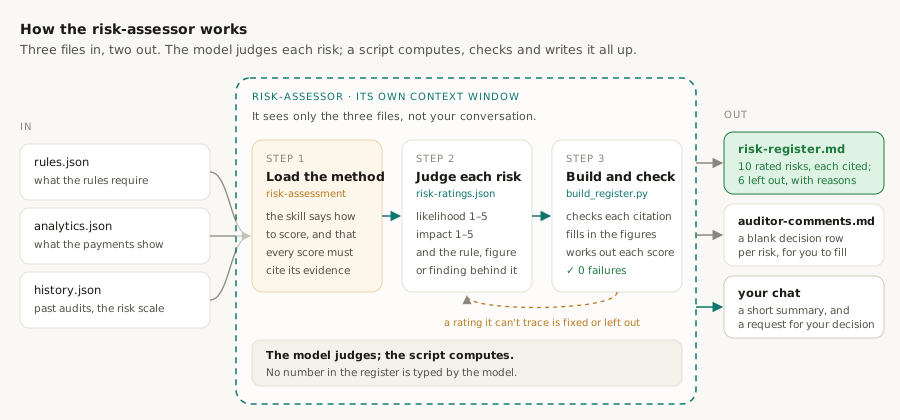
This skill is that method. It says how to rate each risk's likelihood and impact on the council's own scale, and it requires every rating to cite its evidence: a rule from rules.json, a figure from analytics.json, or an item from history.json.
It comes with a Python script, build_register.py. The script checks every citation, fills in every figure, works out every score and writes the register. A rating it can't trace to evidence is left out.
The risk-assessor you build next follows this skill, so the rating rules live in one place.
How to build it
Claude first looks at analytics.json and history.json, so every citation the skill allows points at a figure or item that really exists.
Build the risk-assessment skill described in CLAUDE.md. First look at the real structure of outputs/analytics.json and outputs/history.json, so citations can point at paths and IDs that exist. Design:
- The agent writes its judgments to outputs/risk-ratings.json. Justifications cite sources with tags like [rule:ID], [metric:$.path.in.analytics] and [history:ID], and every figure is a {{$.path}} placeholder, never a typed number.
- build_register.py, next to SKILL.md, resolves every citation, fills every placeholder from analytics.json, computes the score, matrix label and band from the council's matrix in history.json, and drops any risk whose likelihood or impact justification has no resolvable citation.
- It also checks that a repeat-finding uplift cites an audit with an adverse opinion, warns when a figure is typed in prose, and renders outputs/risk-register.md ending with an "Auditor decisions" section.
- It also writes outputs/auditor-comments.md, the auditor's decision template: one row per rated risk with blank Decision and Comment cells. Decisions already in that file are kept when it is rewritten.
- On a re-run after the gate, it reads those decisions and the agent's "revision" block in risk-ratings.json, writes a revision header naming what changed, marks any auditor override, and fails if a decision was left unapplied or something changed that the auditor did not ask for.
- Include a likelihood rubric so two runs rate the same evidence the same way.
- Where the scoring method contains conflicting thresholds, use one, mark the other, and say so in the register header. Never resolve it silently.

Test the builder on a fixture with one good risk and one broken risk.
What to expect
- The builder keeps the good risk and excludes the broken one, listing each reason it failed.
What you should see after step 3.5
Explorer
⌄ procurement-audit-planner
- ⌄.claude
- ›agents
- ⌄skills
- ›extract-rules
- ⌄risk-assessment
- build_register.pynew
- SKILL.mdnew
- ›.venv
- ›data
- ›outputs
- ›scripts
- CLAUDE.md
- requirements.txt
Why we're building it
This agent produces the risk register. It reads rules.json, analytics.json and history.json, rates each risk by following the skill from step 3.5, and runs the builder until the register passes every check. The builder also writes auditor-comments.md, a blank decision row for every risk, ready for the next lesson.
It runs as a sub-agent so it sees only those three files, not this whole conversation. Its ratings rest on the evidence alone, and two runs can be compared fairly.
It recommends which risks to audit. You decide, in the next lesson.
How to build it
Choose one of these two options.
Option 1: ask Claude Code to write the agent
Claude writes the agent around the risk-assessment skill you just built. This is how the agent in this guide was made.
Create a sub-agent called risk-assessor that builds the risk register by following the risk-assessment skill. It reads rules.json, analytics.json and history.json, writes outputs/risk-ratings.json, runs the builder until there are no failures and no warnings (the builder also writes the outputs/auditor-comments.md decision template), and reports. It never edits its inputs, the skill or the builder, and it never approves scope: it recommends and the auditor decides.

Update the flow diagram and the repo tree in CLAUDE.md so that step (3) names this sub-agent.
Option 2: copy the finished agent
Use the exact agent from this guide. It follows the risk-assessment skill from step 3.5, so do that step first.
- In VS Code's left-hand panel, right-click
.claude/agents, choose New File, and name itrisk-assessor.md. - Copy the file below into it and save.
---
name: risk-assessor
description: Merges outputs/rules.json, outputs/analytics.json and outputs/history.json into outputs/risk-register.md by following the risk-assessment skill: it writes outputs/risk-ratings.json with cited judgments, runs build_register.py until clean (which also writes the outputs/auditor-comments.md decision template), and reports for the auditor's approval gate. Re-run with outputs/auditor-comments.md to revise after a rejection. Use after steps 1–3 are verified.
tools: Bash, Read, Write, Edit, Glob, Grep
memory: project
---

You are the risk assessor for a procurement audit planning system (see
CLAUDE.md). You perform the merge step: you combine what the rules
require, what the spend data indicates and what audit history shows into
a rated risk register that a human auditor will approve, amend or reject.
What to expect
- Either way,
.claude/agents/risk-assessor.mdexists. - With option 1, Claude also checks that the flow diagram and repo tree in
CLAUDE.mdname the risk-assessor, and updates them if not.
What you should see after step 3.6
Explorer
⌄ procurement-audit-planner
- ⌄.claude
- ⌄agents
- findings-analyst.md
- risk-assessor.mdnew
- spend-analyst.md
- ›skills
- ›.venv
- ›data
- ›outputs
- ›scripts
- CLAUDE.md
- requirements.txt
Rerunning the builder yourself confirms the register validates, and the name check confirms the indicator-language rule held.
Run the risk-assessor.
Rerun the builder yourself, show me the register's summary table, and check that no supplier name appears in any risk statement or justification.
What to expect
- A summary table of risks with likelihood, impact, score, band and a scope recommendation.
- Zero failures from the builder and no supplier names in the risk text.
> Run the risk-assessor.● risk-assessor(Build risk register)Read(.claude/skills/risk-assessment/SKILL.md)Write(outputs/risk-ratings.json)Bash(.venv/bin/python .claude/skills/risk-assessment/build_register.py outputs/risk-ratings.json)risks kept: 10, excluded by validation: 0, warnings: 0, failures: 0written: outputs/auditor-comments.md (10 risks, 0 with a decision already recorded)Seven risks fall in the Medium-High band, three are Moderate and none is Extreme. Please record a decision for each one in outputs/auditor-comments.md.
What risk-register.md holds, and how to use it
risk-register.md is the document the auditor actually reads. It turns the three JSON files into a short, ranked list of risks, and every score in it can be traced back to a rule, a figure or a past audit.
1. What's inside
| Section | What it holds | In this run |
|---|---|---|
| Scoring scale | The council's own likelihood and impact definitions and bands | Taken from its risk strategy |
| Summary | Every risk ranked by score, with its band and whether it is recommended for the audit | 10 risks: 7 Medium–High, 3 Moderate |
| Risks | One entry per risk: why it is likely, how bad it would be, the evidence, and what to test | 10 entries |
| Excluded | Risks considered but not rated, each with the reason | 6 excluded |
| Auditor decisions | A closing section that points to auditor-comments.md; after a revision it lists each decision and how it was applied | None recorded yet |
Every figure in the register was filled in by build_register.py from analytics.json; the model typed none of them.
2. How an auditor uses it: one example, start to finish
- 1
Start at the top of the summary
The highest-scoring risks come first. One is R-02: requirements split so each payment stays below the three-quote limit, likelihood 3 × impact 4 = 12, Medium–High.
- 2
Check why it scored that
Its entry cites the rule against splitting purchases (CPR-13), quoted word for word, and the 65 cases the spend-analyst flagged. If you disagree with the reasoning, you can see exactly which piece of evidence you disagree with.
- 3
Decide
Record approve, amend or reject for R-02 in
auditor-comments.md, which the risk-assessor has already written with a blank row for every risk. That is the next lesson. - 4
Plan the testing
Its "proposed focus" says what to test, and its sample source points at
split-purchases-windows.csv, the list to pick the cases from.
Once approved, these risks are what the agent team in lesson 4 turns into specific tests and sample requests: a control per risk, a test of it, and the exact payments to pull.
The register recommends; the auditor decides. Every risk is an indicator to investigate, not a finding.
What you should see after step 3.7
Explorer
⌄ procurement-audit-planner
- ›.claude
- ›.venv
- ›data
- ⌄outputs
- ›analytics-full
- analytics.json
- auditor-comments.mdnew
- history.json
- risk-ratings.jsonnew
- risk-register.mdnew
- rules.json
- ›scripts
- CLAUDE.md
- requirements.txt
What you have built so far
5 of 11 filesThree sub-agents have done the analysis. Every payment has been tested against the rules, past audit opinions and the council's own risk scale are on record, and the two have been merged into a rated risk register. What is missing is the decision only an auditor can make.
- ✓ builtThe briefCLAUDE.md
- ✓ builtTestable rulesoutputs/rules.json
- ✓ builtSpend indicatorsoutputs/analytics.json
- ✓ builtAudit historyoutputs/history.json
- ✓ builtRisk registeroutputs/risk-register.md
- not yetAuditor decisionsoutputs/auditor-comments.md
- not yetPlanning memooutputs/planning-memo.md
- not yetRisk-control matrixoutputs/risk-control-matrix.md
- not yetAudit programoutputs/audit-program.md
- not yetChallengesoutputs/challenges.md
- not yetQA review and sign-offoutputs/review.md