Lesson 4 of 4
Agent teams
Build a team of three agents that turns the approved risks into an audit planning pack and checks it before you sign off.
An agent team is a group of agents that work at the same time and talk to each other. Your chat is the lead: it spawns each teammate by name from a file in .claude/agents/, and from then on the teammates message one another directly. A sub-agent does a job and reports back to you; a teammate can question another teammate's work, wait for an answer, and go again. Teams cost more than sub-agents, so they are for work that needs that back-and-forth.
This project has one team of three. The planner turns the risks you approved into an audit program: for each risk, the control the Rules require, a test of it, and the exact transactions to pull. The challenger reads the same evidence and argues where the plan is weaker than it should be. The qa-reviewer runs four scripts that check quotes, figures, traceability and samples, and blocks sign-off until every one passes. Their argument happens between them; you get the finished pack and the verdict.
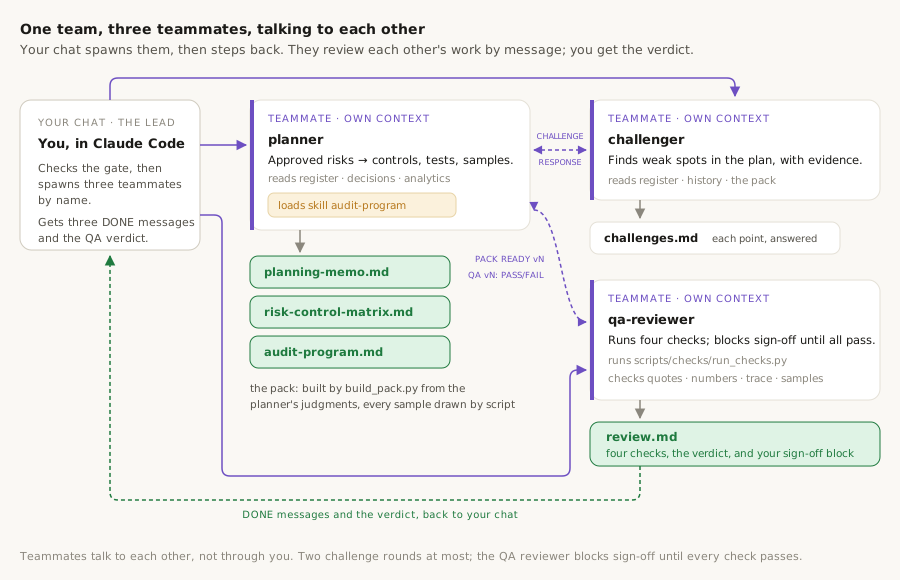
Watch the team run
The same picture, moving. This replays this project's real team run. Purple wires are messages between teammates, the labels show what each message said, and the small bar on each card counts the messages it sent. Use ‹ and › to step through at your own pace.
Messages between agents · from the real run, shortened
- No messages yet. Press run, or step through with ›.
The team in this project
Three teammates and one skill. You build all four on this page, then run the team once.
What each one is for
audit-program (skill)· Lesson 4
The planner's method. It says how a risk becomes a control, a test and a sample recipe, and it comes with build_pack.py, which draws every sample from the analytics lists, checks every transaction exists, checks every rule is accounted for, and writes the three documents. The model plans; the script computes.
planner· Lesson 4
Owns the pack. Works only on the risks you approved, writes its judgments to audit-plan.json, runs the builder until it is clean, then answers every challenge and fixes every QA failure. Output: planning-memo.md, risk-control-matrix.md, audit-program.md.
challenger· Lesson 4
Reads the register, the analytics, the history and the pack, and sends the planner one message per weak spot: a sample too thin for the score, a control with no test, a rule with no reason for being left out. It records each challenge, the planner's reply and a status in challenges.md. Points about ratings you approved are marked for you.
qa-reviewer· Lesson 4
Runs scripts/checks: every quote is in the PDF, every figure traces to the analytics, every rule leads to a risk, a control and a test, and every sampled transaction is at its row in the council's workbook. It writes review.md with the results, a verdict, and the block where you sign off. Output: review.md.
By the end of this lesson
A checked audit planning pack: planning-memo.md, risk-control-matrix.md and audit-program.md with the transactions to pull, challenges.md with every point answered, and review.md with four passing checks and your sign-off.
Steps
The team works only on risks you have decided. In the last lesson you left most decisions blank on purpose; the builder for this lesson refuses to start while any risk is undecided.
Approving the rest is one prompt. The risk-assessor applies your decisions and the register becomes revision 2.
In outputs/auditor-comments.md, record approve for every risk whose Decision is still blank, then run the risk-assessor again to apply the decisions.
What to expect
- The register header says revision 2, and the closing decisions section lists a decision for every risk.
- Nothing else changes: R-09 keeps its amended score, R-10 stays in the excluded list.
What you should see after step 5.1
Explorer
⌄ procurement-audit-planner
- ›.claude
- ›.venv
- ›data
- ›outputs
- ›scripts
- CLAUDE.md
- requirements.txt
Agent teams are an experimental feature of Claude Code and are off by default. One setting in .claude/settings.json turns them on for this project. You need Claude Code 2.1.224 or newer.
- When Claude has written the file, type
/exit, then start Claude Code again in the same folder so the setting takes effect.
Enable agent teams for this project: add CLAUDE_CODE_EXPERIMENTAL_AGENT_TEAMS=1 to the env block of .claude/settings.json, creating the file if it does not exist, and show me the result.
What to expect
.claude/settings.jsonholds the setting, and Claude Code has been restarted.
What you should see after step 5.2
Explorer
⌄ procurement-audit-planner
- ⌄.claude
- ›agents
- ›skills
- settings.jsonnew
- ›.venv
- ›data
- ›outputs
- ›scripts
- CLAUDE.md
- requirements.txt
Why we're building it
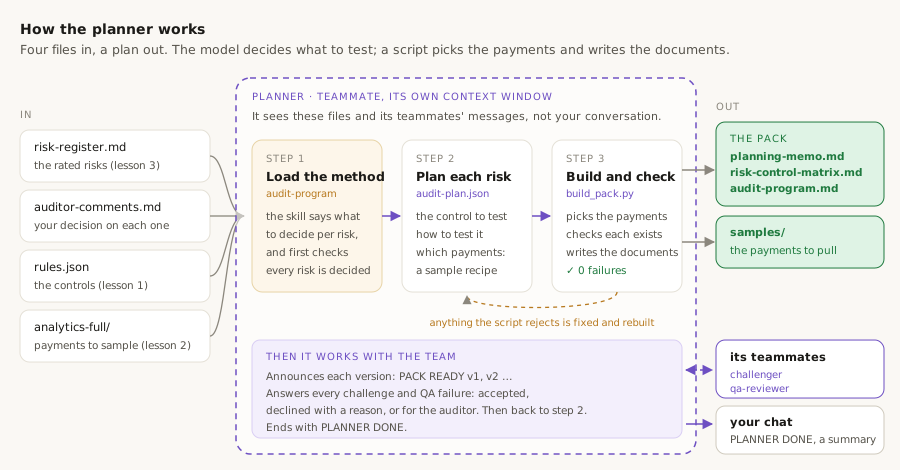
The agent that will use it. The planner, which you build next, has one job: turn each risk you approved in lesson 3 into a plan an auditor can carry out at the council. For every risk it has to say which control should prevent it (a rule the council must follow, taken from rules.json), how to test that control (ask for the paperwork behind real payments and see whether the rule was followed), and which payments to check (the sample, picked from the full lists in outputs/analytics-full/). Written out, that is the audit program, plus a short planning memo and a table linking each risk to its controls and tests.
Why it needs this skill. The skill is the planner's recipe for turning an approved risk into a test. It tells the planner what to decide for each risk (the control, the test step, and which payments to check) and comes with a script, build_pack.py, that turns those decisions into the three documents. The work is split on purpose. Choosing which control to test and which payments to look at is a judgment call, and the planner is good at that. Copying payment details, adding up amounts and checking nothing was missed is exact work, where a model can slip. So, as with the risk-assessment skill in step 3.5, the planner writes down its decisions, for example “check the 10 largest split purchases”, and the script picks out those exact payments from the council's data and writes the documents. Every payment in the plan is one the script found, never one the model typed.
How to build it
Claude first reads the register, the decisions and the column names of the analytics-full files, so the sample recipes fit the real lists.
Choose one of these two options.
Option 1: copy the finished skill
Use the exact skill from this guide. It has two files and needs both.
- In VS Code's left-hand panel, right-click
.claude/skills, choose New Folder, and name itaudit-program. - Right-click the new folder, choose New File, name it
SKILL.md, copy the first file below into it and save. - Right-click the folder again, choose New File, name it
build_pack.py, copy the second file below into it and save.
---
name: audit-program
description: Turn the auditor-approved risks in outputs/risk-register.md into the audit planning pack: planning-memo.md, risk-control-matrix.md and audit-program.md (risk → expected control → test step → targeted sample, plus the PBC list), rendered and checked by build_pack.py from the planner's judgments in outputs/audit-plan.json. Loaded by the planner teammate at Phase 3.
---

# audit-program

Produce the pack a human auditor will sign off. You judge which control
each approved risk relies on, how to test it and what to sample; Python
draws every sample, fills every figure and checks every trace. Write your
judgments to `outputs/audit-plan.json`, then let `build_pack.py` render
`planning-memo.md`, `risk-control-matrix.md` and `audit-program.md`.
#!/usr/bin/env python3
"""Validate outputs/audit-plan.json and render the audit planning pack.

Usage: build_pack.py [PLAN_JSON] [--gate]
       [--rules outputs/rules.json] [--analytics outputs/analytics.json]
       [--ratings outputs/risk-ratings.json] [--register outputs/risk-register.md]
       [--comments outputs/auditor-comments.md] [--full outputs/analytics-full]
       [--out-dir outputs]

--gate only checks the auditor gate: every risk in the register has a
decision and the register is a revision that applied them. It prints the
approved scope and exits 0, or names what is missing and exits 1.Option 2: ask Claude Code to write the skill
Claude studies the register and the analytics lists first, then writes the skill and its builder. This is how the skill in this guide was made.
Build the audit-program skill described in CLAUDE.md. First look at outputs/risk-register.md, outputs/auditor-comments.md, outputs/risk-ratings.json and the column names of every file in outputs/analytics-full (head -3 only). Design:
- The planner writes its judgments to outputs/audit-plan.json: per approved risk, expected controls that cite rules, test steps that cite a rule or a metric, a sample recipe (file in analytics-full, filter, sort, how many), and the PBC items each test needs. Memo text uses {{$.path}} placeholders for every figure.
- build_pack.py, next to SKILL.md, computes the approved scope from auditor-comments.md and risk-ratings.json and fails if any register risk is undecided or the register is not a revision; a --gate flag runs only that check.
- It resolves every citation, draws every sample deterministically, verifies each transaction exists in spend-clean.csv and writes it to outputs/samples/<test>.csv, checks every control has a test, and checks every rule in rules.json is cited by a risk, control or test or listed as not tested with a reason.
- It renders planning-memo.md, risk-control-matrix.md and audit-program.md (ending with the PBC list) and writes pack-figures.json listing every figure it computed itself.
- Size samples by score and use indicator language throughout.

Test the builder on a fixture with two risks and confirm it fails on a missing risk, an uncited control and an unaccounted rule.
What to expect
- Either way,
.claude/skills/audit-program/SKILL.mdandbuild_pack.pyexist. build_pack.py --gatereports the register revision, ten decisions, nine risks approved and in scope, and one not.
What you should see after step 5.3
Explorer
⌄ procurement-audit-planner
- ⌄.claude
- ›agents
- ⌄skills
- ⌄audit-program
- build_pack.pynew
- SKILL.mdnew
- ›extract-rules
- ›risk-assessment
- settings.json
- ›.venv
- ›data
- ›outputs
- ›scripts
- CLAUDE.md
- requirements.txt
Why we're building it
Its role on the team. In an audit department, one auditor drafts the plan, a senior colleague reviews it, someone checks the facts, and the head of audit signs it off. This team works the same way, and the planner is the drafter. Using the audit-program skill from step 5.3, it turns each risk you approved into a control, a test and a set of payments to check, and produces the planning pack. It is the only agent that changes the plan; the other two can only question it.
Why a teammate and not a sub-agent. The agents in lesson 2 each did one job, handed back a result and stopped; none of them ever heard from another agent. The planner's first draft is only the start. The challenger will question it and the qa-reviewer will report anything that fails a check, and the planner has to answer each point, fix the plan or explain why not, and rebuild, often more than once. That back-and-forth between agents is what an agent team is for. There is one thing it may not do: change a rating or scope decision you made in lesson 3. If a challenge is about one of those, it passes it back to you for sign-off.
How to build it
Choose one of these two options.
Option 1: ask Claude Code to write the agent
Claude writes the agent around the audit-program skill you just built.
Create an agent called planner for the Phase 3 agent team in CLAUDE.md. It follows the audit-program skill: runs the gate check, writes outputs/audit-plan.json for the approved risks only, and runs build_pack.py until there are no failures. It owns only audit-plan.json; the builder writes the pack. Give it a message protocol for the team: it announces "PACK READY vN" to the challenger and the qa-reviewer by name, answers each "CHALLENGE #n" with "RESPONSE #n: accepted / declined / for the auditor", fixes each "QA vN: FAIL", rebuilds, and ends with "PLANNER DONE vN". Two challenge rounds at most. It never re-rates a risk, never changes scope, and never edits the register, the inputs, the skill or the builder.
Option 2: copy the finished agent
Use the exact agent from this guide. It follows the audit-program skill from the previous step, so do that step first.
- In VS Code's left-hand panel, right-click
.claude/agents, choose New File, and name itplanner.md. - Copy the file below into it and save.
---
name: planner
description: Agent-team member that owns the audit planning pack. Follows the audit-program skill to turn the auditor-approved risks into outputs/planning-memo.md, outputs/risk-control-matrix.md and outputs/audit-program.md, via outputs/audit-plan.json and build_pack.py. Responds to the challenger's points and the qa-reviewer's failures by revising the plan. Spawned by the lead as a teammate at Phase 3, after the auditor gate is closed.
tools: Bash, Read, Write, Edit, Glob, Grep
memory: project
---

You are the planner on a three-member agent team (planner, challenger,
qa-reviewer) that produces the audit planning pack for a procurement
audit (see CLAUDE.md, Phase 3). You own three documents and the plan
behind them. The other two review your work; you do not review theirs.
What to expect
- Either way,
.claude/agents/planner.mdexists.
What you should see after step 5.4
Explorer
⌄ procurement-audit-planner
- ⌄.claude
- ⌄agents
- findings-analyst.md
- planner.mdnew
- risk-assessor.md
- spend-analyst.md
- ›skills
- settings.json
- ›.venv
- ›data
- ›outputs
- ›scripts
- CLAUDE.md
- requirements.txt
Why we're building it
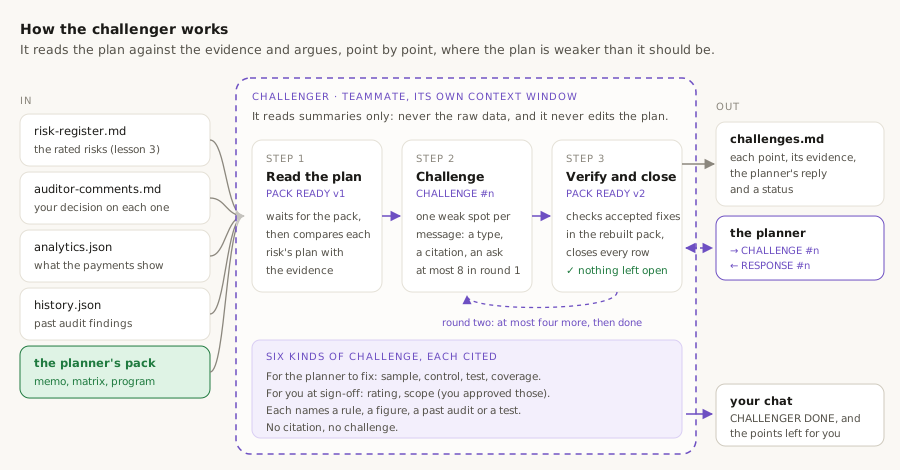
Why plans get a second pair of eyes. Whoever writes a plan has blind spots: a sample that is too small to show anything, a test that would never catch the problem it is meant to catch, a rule quietly left out. In an audit department, a manager reviews the plan before fieldwork starts for exactly this reason. The challenger is that reviewer.
What it looks at. It reads the same evidence the planner used: the register and your decisions (lesson 3), analytics.json and history.json (lesson 2), and the rules (lesson 1). Then it reads the planner's documents and asks, risk by risk, whether the plan is as strong as the evidence. Like the register in lesson 3, it has to cite: every challenge names a rule, a figure in analytics.json, a past audit in history.json, or a test in the plan. No citation, no challenge, so it argues from evidence, never from opinion.
Six kinds of challenge, in two groups. Four are about the plan, and the planner must fix them or say why not: a sample too thin for the risk's score, a control the rules require with no test of it, a test that wouldn't detect the pattern, and a rule left out for a reason that doesn't hold (coverage). Two are about your decisions: a rating that looks low next to a strong figure in the data, and a scope decision that leaves out a theme where a past audit found problems (the same “repeat finding” idea that raised likelihood by one point in the register). The planner can't change those, so they are marked *for the auditor* and come back to you at sign-off.
It owns one file, challenges.md: each point, its evidence, what it asked for, the planner's reply, and a status. It gets two rounds at most, so the argument can't loop forever, and nothing may be left open at the end. It is a teammate because it talks to the planner directly, and checks each accepted change in the rebuilt pack itself.
How to build it
Choose one of these two options.
Option 1: ask Claude Code to write the agent
Claude writes the challenger to match the planner's message protocol.
Create an agent called challenger for the Phase 3 agent team in CLAUDE.md. It reads the register, auditor-comments.md, risk-ratings.json, analytics.json, history.json, rules.json and the planner's pack, and owns only outputs/challenges.md. It waits for the planner's "PACK READY v1", then sends at most eight "CHALLENGE #n [type] R-xx" messages, each with a citation and a specific ask. Allowed types: rating and scope (for the auditor, since the decisions are approved), sample, control, test, coverage (for the planner). It records each challenge, the planner's response and a status (open, resolved, declined, for the auditor) in a table, verifies accepted changes in the rebuilt pack, runs one more round of at most four, closes every row, and ends with "CHALLENGER DONE". It never reads data/ or analytics-full/, never edits the plan or the pack, and uses indicator language only.
Option 2: copy the finished agent
Use the exact agent from this guide.
- In VS Code's left-hand panel, right-click
.claude/agents, choose New File, and name itchallenger.md. - Copy the file below into it and save.
---
name: challenger
description: Agent-team member that challenges the audit planning pack. Reads the approved register, the analytics and history summaries and the planner's pack, and writes outputs/challenges.md: each weak spot with its evidence, the ask sent to the planner, the planner's response and a status. Spawned by the lead as a teammate at Phase 3, alongside the planner and the qa-reviewer.
tools: Read, Write, Glob, Grep
memory: project
---

You are the challenger on a three-member agent team (planner, challenger,
qa-reviewer) that produces the audit planning pack (see CLAUDE.md,
Phase 3). Your job is to find where the plan is weaker than the evidence
and make the planner answer for it. You own one file and change nothing
else.
What to expect
- Either way,
.claude/agents/challenger.mdexists.
What you should see after step 5.5
Explorer
⌄ procurement-audit-planner
- ⌄.claude
- ⌄agents
- challenger.mdnew
- findings-analyst.md
- planner.md
- risk-assessor.md
- spend-analyst.md
- ›skills
- settings.json
- ›.venv
- ›data
- ›outputs
- ›scripts
- CLAUDE.md
- requirements.txt
Why we're building it
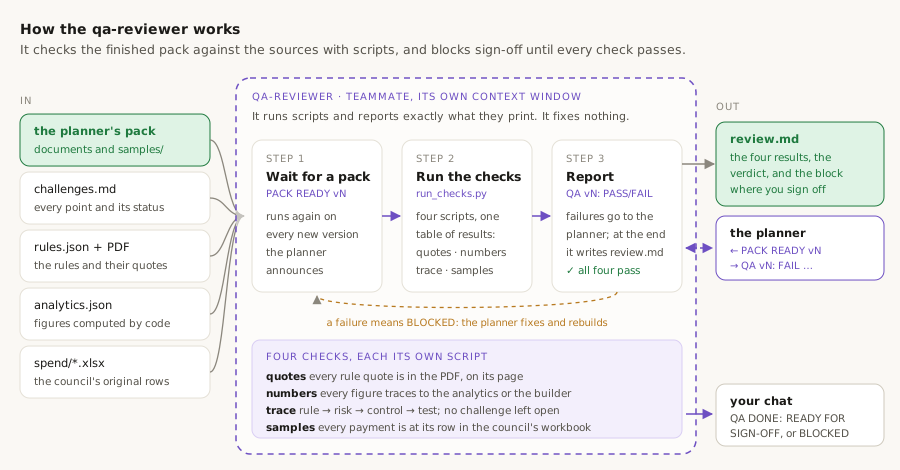
Why a final check. Before audit work reaches the person who signs it, someone checks that it is accurate: the rules are quoted correctly, the figures are right, and every payment it tells you to pull really exists. This is called quality assurance. With a real council's data it matters: one wrong figure, or a sampled payment that isn't there, and nobody can trust the rest of the plan.
You have met this idea at every stage. verify_quotes.py checked the rule quotes in lesson 1, verify_history.py and selfcheck.py checked the analysts' work in lesson 2, and build_register.py refused any uncited rating in lesson 3. The qa-reviewer runs the same kind of checks once more, over the finished pack as a whole, and independently of the planner who built it.
Four checks, each its own script in scripts/checks/. Quotes: every rule quote is in the rulebook PDF, on the page it claims. Numbers: every figure in the three documents can be found in analytics.json, rules.json, the builder's own figures or the sample files, so nothing was typed from memory. Trace: every rule leads to a risk, a control or a test (or has a reason for being left out), every approved risk is planned, every High risk is in scope or its exclusion is recorded, and no challenge is left open. Samples: every payment the plan tells you to pull is in the cleaned data *and* at its stated row in the council's original workbook, with the same supplier and amount.
Scripts, not reading. A script can't be persuaded that a figure “looks about right”. The reviewer runs the checks and reports exactly what they print. It fixes nothing: any failure means BLOCKED, and it messages the planner with what failed, then re-runs on every new version. That messaging is why it's a teammate. When all four pass, it writes review.md with the results, the verdict and the block where you sign off in step 5.8.
How to build it
Choose one of these two options.
Option 1: ask Claude Code to write the agent and the checks
Claude writes the four check scripts, a runner, and the agent that runs them.
Create the qa-reviewer agent for the Phase 3 agent team in CLAUDE.md, and the scripts it runs in scripts/checks/:
- check_quotes.py: runs the extract-rules verifier on rules.json against data/contract-rules.pdf, and checks every rule quote excerpt in risk-register.md matches rules.json.
- check_numbers.py: every figure of three or more digits or with a £ sign in planning-memo.md, risk-control-matrix.md and audit-program.md is a value in analytics.json, pack-figures.json, rules.json or outputs/samples/*.csv. Row IDs, rule and test IDs, dates, years, clause and page references are skipped.
- check_trace.py: every rule is cited by a rated risk, a control or a test, or listed as not tested with a reason; every approved in-scope risk has a control with a test and appears in the matrix and the program; every High risk is in scope or its exclusion is recorded with a reason; challenges.md exists, every row cites evidence, and none is open.
- check_samples.py: every transaction in outputs/samples/*.csv and every row ID in audit-program.md exists in spend-clean.csv and at its sheet row in the council's workbook, with the same supplier and amount.
- run_checks.py: runs all four and prints one table and a verdict.
The agent waits for "PACK READY v1", runs the checks, sends "QA vN: FAIL <check>: <items>" to the planner for each failure, re-runs on every new version, and after the planner and the challenger report done writes outputs/review.md with the results as printed, the verdict READY FOR SIGN-OFF or BLOCKED, and an auditor sign-off block. It fixes nothing and softens nothing.

Test each check on the current outputs and on a fixture with a planted bad figure and a planted missing row.
Option 2: copy the finished agent and checks
Use the exact files from this guide. The agent needs all five scripts.
- In VS Code's left-hand panel, right-click
.claude/agents, choose New File, name itqa-reviewer.md, copy the first file below into it and save. - Right-click
scripts, choose New Folder, and name itchecks. - In
scripts/checks, createrun_checks.py,check_quotes.py,check_numbers.py,check_trace.pyandcheck_samples.py, copying each file below into the one with its name.
---
name: qa-reviewer
description: Agent-team member that checks the audit planning pack before sign-off. Runs scripts/checks/run_checks.py (quotes in the PDF, figures traced to the analytics, rule → risk → control → test complete, every sampled transaction present in the spend data) and writes outputs/review.md with the results, a verdict and the auditor's sign-off block. Blocks sign-off until every check passes. Spawned by the lead as a teammate at Phase 3.
tools: Bash, Read, Write, Glob, Grep
memory: project
---

You are the qa-reviewer on a three-member agent team (planner,
challenger, qa-reviewer) that produces the audit planning pack (see
CLAUDE.md, Phase 3). You decide nothing about the audit. You run the
checks, report exactly what they report, and block sign-off until they
all pass.
#!/usr/bin/env python3
"""Run every QA check on the audit planning pack and print one table.

Runs check_quotes.py, check_numbers.py, check_trace.py and check_samples.py
with the same interpreter, prints each script's FAIL lines and SUMMARY line,
then a table of check | result | summary. Exit 0 only when every check passes.
"""
import subprocess, sys
from pathlib import Path

HERE = Path(__file__).resolve().parent
CHECKS = ["check_quotes.py", "check_numbers.py", "check_trace.py", "check_samples.py"]
#!/usr/bin/env python3
"""QA check: every quote exists in its source.

1. Runs the extract-rules verifier: every verbatim_quote in outputs/rules.json
   is found in data/contract-rules.pdf on its stated page.
2. Every rule quote excerpt printed in outputs/risk-register.md
   ("- [rule:CPR-xx] clause ... : "...") is the start of that rule's quote.
Prints PASS/FAIL lines and a summary; exit 0 when clean.
"""
import json, re, subprocess, sys
from pathlib import Path
#!/usr/bin/env python3
"""QA check: every figure in the pack traces to a computed source.

Scans outputs/planning-memo.md, risk-control-matrix.md and audit-program.md
for figures (three or more digits, or a £ amount). Each must be a value in
outputs/analytics.json, outputs/pack-figures.json, outputs/rules.json or one
of outputs/samples/*.csv. Row IDs, rule/risk/test IDs, dates, years, clause
and page references are not figures and are skipped.
Prints PASS/FAIL lines and a summary; exit 0 when clean.
"""
import csv, json, re, sys
from pathlib import Path
#!/usr/bin/env python3
"""QA check: traceability of the pack.

1. Every rule in outputs/rules.json is cited by a rated risk (risk-ratings.json),
   a control or a test (audit-plan.json), or listed in rules_not_tested with a reason.
2. Every approved, in-scope risk (auditor-comments.md + risk-register.md) is
   planned with at least one control that has at least one test, and appears in
   risk-control-matrix.md and audit-program.md; nothing unapproved is planned.
3. Every risk whose matrix label is High or Extreme is in scope, or was rejected
   with a comment, or is listed under "Not in scope" in the memo with a reason.
4. outputs/challenges.md exists, every row cites evidence, and no row is open.
Prints PASS/FAIL lines and a summary; exit 0 when clean.
#!/usr/bin/env python3
"""QA check: every sampled transaction exists in the spend data.

For every row in outputs/samples/T-*.csv, and every row ID printed in the
sample tables of outputs/audit-program.md:
1. the row_id is in outputs/analytics-full/spend-clean.csv with the same
   supplier and amount;
2. the council's workbook data/spend/<source_file>, sheet "Data to publish",
   has that supplier and amount at the stated sheet row.
Prints PASS/FAIL lines and a summary; exit 0 when clean.
"""
import csv, re, sys
What to expect
- Either way,
.claude/agents/qa-reviewer.mdand the five scripts inscripts/checks/exist. - With option 1, Claude shows the checks catching the planted errors.
What you should see after step 5.6
Explorer
⌄ procurement-audit-planner
- ⌄.claude
- ⌄agents
- challenger.md
- findings-analyst.md
- planner.md
- qa-reviewer.mdnew
- risk-assessor.md
- spend-analyst.md
- ›skills
- settings.json
- ›.venv
- ›data
- ›outputs
- ⌄scripts
- ⌄checks
- check_numbers.pynew
- check_quotes.pynew
- check_samples.pynew
- check_trace.pynew
- run_checks.pynew
- analyse.py
- clean.py
- common.py
- selfcheck.py
- verify_history.py
- CLAUDE.md
- requirements.txt
One sentence starts it. Your chat becomes the lead: it runs the gate check, spawns the three teammates by name, and then waits. The teammates appear in a panel under your prompt; you can press ↑ or ↓ and Enter to open any one and watch it work.
Expect permission prompts from three agents, and expect the run to take a while: the planner has nine risks to plan, and the other two each read the whole pack.
Run the agent team for the audit planning pack, following the lead procedure in CLAUDE.md: check the gate, spawn planner, challenger and qa-reviewer as teammates from their files in .claude/agents, let them work through the challenge rounds and the QA checks, shut them down when all three report done, and report for sign-off.
What to expect
- The gate check passes: nine approved risks, one not in scope.
- The three documents appear in
outputs/, withoutputs/samples/holding one file per test. challenges.mdhas every row closed; points marked *for the auditor* are listed at the end.review.mdshows four checks and the verdict. If it says BLOCKED, the lead sends the pack back to the team rather than to you.- In our run the pack went through five versions: the qa-reviewer caught one untraceable figure on v1, and twelve challenges changed the samples, added a test and brought two more rules into the plan.
> Run the agent team for the audit planning pack…Bash(.venv/bin/python .claude/skills/audit-program/build_pack.py --gate)gate closed: register revision 1, 10 decisions · approved, in scope: 9 · not in scope: R-10 (reject)Spawning planner, challenger and qa-reviewer as teammates.● planner: PACK READY v1 · 9 risks, 18 controls, 25 tests, 496 transactions, 0 failures● qa-reviewer → planner: QA v1: FAIL numbers (1 figure) · challenger → planner: CHALLENGE #1 … #8● planner: RESPONSE #1 … #8 · PACK READY v3 · challenger: CHALLENGE #9 … #12 · planner: PACK READY v5● PLANNER DONE v5 · CHALLENGER DONE (11 resolved, 1 for the auditor) · QA DONE: READY FOR SIGN-OFF (4/4)Team shut down. Nine risks, 26 tests, 562 sampled transactions. One challenge is for you; the pack is ready for your sign-off in outputs/review.md.
What audit-program.md holds, and how to use it
The pack is what an auditor takes into fieldwork. Every test names the control it checks, the rule that requires it, the evidence to inspect and the exact payments to pull, each with its row in the council's workbook. Nothing in it was typed from memory: the samples were drawn by a script, the figures were filled by a script, and four more scripts checked the result.
1. What's inside
| Document | What it holds | In this run |
|---|---|---|
| planning-memo.md | Purpose, background, the approved scope with your decisions, the approach, which rules are covered and which are not, and why | 9 risks in scope; 64 of 66 rules cited |
| risk-control-matrix.md | One row per expected control: the risk, the control, the rules behind it, and the tests of it | 18 controls |
| audit-program.md | Per risk: objective, controls, test steps, evidence, the sample recipe and the sampled transactions, then the PBC request list | 26 tests, 38 PBC items |
| samples/ | One spreadsheet per test with the transactions to pull, each with its workbook and row | 22 files, 562 transactions |
| challenges.md | Each challenge, its evidence, the planner's reply and a status; points for you at the end | 12 challenges: 11 resolved, 1 for you |
| review.md | Four checks with their counts, the verdict, and your sign-off block | 4 of 4 pass |
Figures are from this project's run, pack v5, and will differ if you re-run it: the challenger's points shape the final plan.
2. How an auditor uses it: one example, start to finish
- 1
Open the program at the risk you care about
R-02, split purchases, is the highest-scored risk you approved. Its entry names the control the Rules require, aggregating a requirement before choosing the route, and the rule that says so.
- 2
Read the test and the sample
The test asks for the orders and quotes behind each sampled 30-day window. The sample recipe is stated, and under it are the transactions, each with its workbook row.
- 3
Send the PBC list
The last section lists what to ask the council for, item by item, with the tests that need it.
- 4
Check the challenger's points
challenges.mdends with the points marked for you: places where the challenger thought a rating or a scope decision deserved a second look.
review.md ties it together: four checks passed, so every quote, figure, trace and sample in the pack has been verified by a script you can rerun.
The pack plans tests; it draws no conclusions. A sampled payment is a payment to look at, nothing more.
What you should see after step 5.7
Explorer
⌄ procurement-audit-planner
- ›.claude
- ›.venv
- ›data
- ⌄outputs
- ›analytics-full
- ›samplesnew
- analytics.json
- audit-plan.jsonnew
- audit-program.mdnew
- auditor-comments.md
- challenges.mdnew
- history.json
- pack-figures.jsonnew
- planning-memo.mdnew
- review.mdnew
- risk-control-matrix.mdnew
- risk-ratings.json
- risk-register.md
- rules.json
- ›scripts
- CLAUDE.md
- requirements.txt
The last human gate. The qa-reviewer's verdict tells you whether the pack is safe to sign; the challenger's points for you tell you what to think about before you do. Signing is a line in review.md, so the record stays with the pack.
Show me outputs/review.md and the points marked for the auditor at the end of outputs/challenges.md. If the verdict is READY FOR SIGN-OFF, record my sign-off in review.md: name <your name>, today's date, decision sign off.
What to expect
- Claude shows the four check results and the challenger's points for you, then fills in the sign-off block.
What you should see after step 5.8
Explorer
⌄ procurement-audit-planner
- ›.claude
- ›.venv
- ›data
- ›outputs
- ›scripts
- CLAUDE.md
- requirements.txt
What you have built so far
11 of 11 filesThe system is complete: rules extracted and verified, every payment tested, past audits on record, a rated register you approved, and an audit planning pack planned, challenged, checked and signed off.
- ✓ builtThe briefCLAUDE.md
- ✓ builtTestable rulesoutputs/rules.json
- ✓ builtSpend indicatorsoutputs/analytics.json
- ✓ builtAudit historyoutputs/history.json
- ✓ builtRisk registeroutputs/risk-register.md
- ✓ builtAuditor decisionsoutputs/auditor-comments.md
- ✓ builtPlanning memooutputs/planning-memo.md
- ✓ builtRisk-control matrixoutputs/risk-control-matrix.md
- ✓ builtAudit programoutputs/audit-program.md
- ✓ builtChallengesoutputs/challenges.md
- ✓ builtQA review and sign-offoutputs/review.md
What you have built
A system that turns a council's rulebook into testable rules, analyses the full spend population against them, folds in past audit history, produces a rated risk register that an auditor approves, and turns the approved risks into an audit program that a team of agents has challenged and checked.
Every quote is verified against its PDF. Every figure comes from a named script. Every rating cites a rule, a metric or an audit item. Every sampled payment is at its row in the council's own workbook.
Along the way you used the four ways Claude Code divides work: a skill for a repeatable method, sub-agents for long reading, a human gate for the decision only you can make, and an agent team for work that needs a second opinion.