Procurement Audit Planner
A step-by-step build guide
Build an agent system that plans an internal audit of a council's procurement from its public data. It reads the purchasing rulebook, analyses every payment, folds in past audit history, produces a risk register for a human auditor to approve, and turns the approved risks into a checked audit plan.
Problem statement
Planning a procurement audit is slow, manual and mostly reading-based. Auditors read the Contract Procedure Rules, skim past audit reports, and pick a small random sample of payments without first analysing the full spend data. Consequences:
- Slow. Reading a ~50-page rulebook and years of committee papers takes days.
- Random sampling misses risk. 25 random payments out of ~15,000 will almost certainly miss the handful of suspicious ones.
- Inconsistent. Two auditors produce different risk assessments from the same material; ratings are judgment with no fixed method.
- Patterns invisible one-at-a-time. Split purchases, threshold-hugging and off-contract spend only show up when the whole population is analysed together.
Objectives
- Extract every testable rule from the Contract Procedure Rules with clause references and verbatim quotes.
- Analyse the full spend population against those rules to surface risk indicators (threshold clustering, split purchases, off-contract spend, duplicates), computed by code, never by the LLM.
- Summarise past audit coverage, open actions and registered risks.
- Rate risks on a fixed likelihood × impact scale where every rating cites evidence, producing a risk register a human auditor approves (or rejects).
- For approved risks, produce an audit program (risk → control → test step → targeted sample) and a planning memo.
- Cross-check the whole pack with an agent team and automated scripts before auditor sign-off: quotes exist in sources, numbers match the data, every rule traces to a risk/control/test, every sampled transaction exists.
The final product
An audit planning pack: what an internal auditor takes into fieldwork, with everything in it traceable back to public data. It says what to test, which payments to pull and what to ask the council for. It plans the audit; it does not perform it, and it reaches no findings.
- 1Planning memo
outputs/planning-memo.mdThe one-page brief for the audit: why it is being done, what data was analysed, the risks in scope and the auditor's decision on each, the approach, which rules the audit covers and why the rest are left out, and the limitations.
- 2Risk-control matrix
outputs/risk-control-matrix.mdFor each approved risk, the control the Contract Rules require, the rule it comes from, and the tests that check it.
- 3Audit program
outputs/audit-program.mdThe fieldwork itself. Per risk: the objective, each control, the test step, the evidence to inspect, the sample recipe and the exact payments to pull, each with its row in the council's published workbook. It ends with the list of documents to request from the council.
What you will build
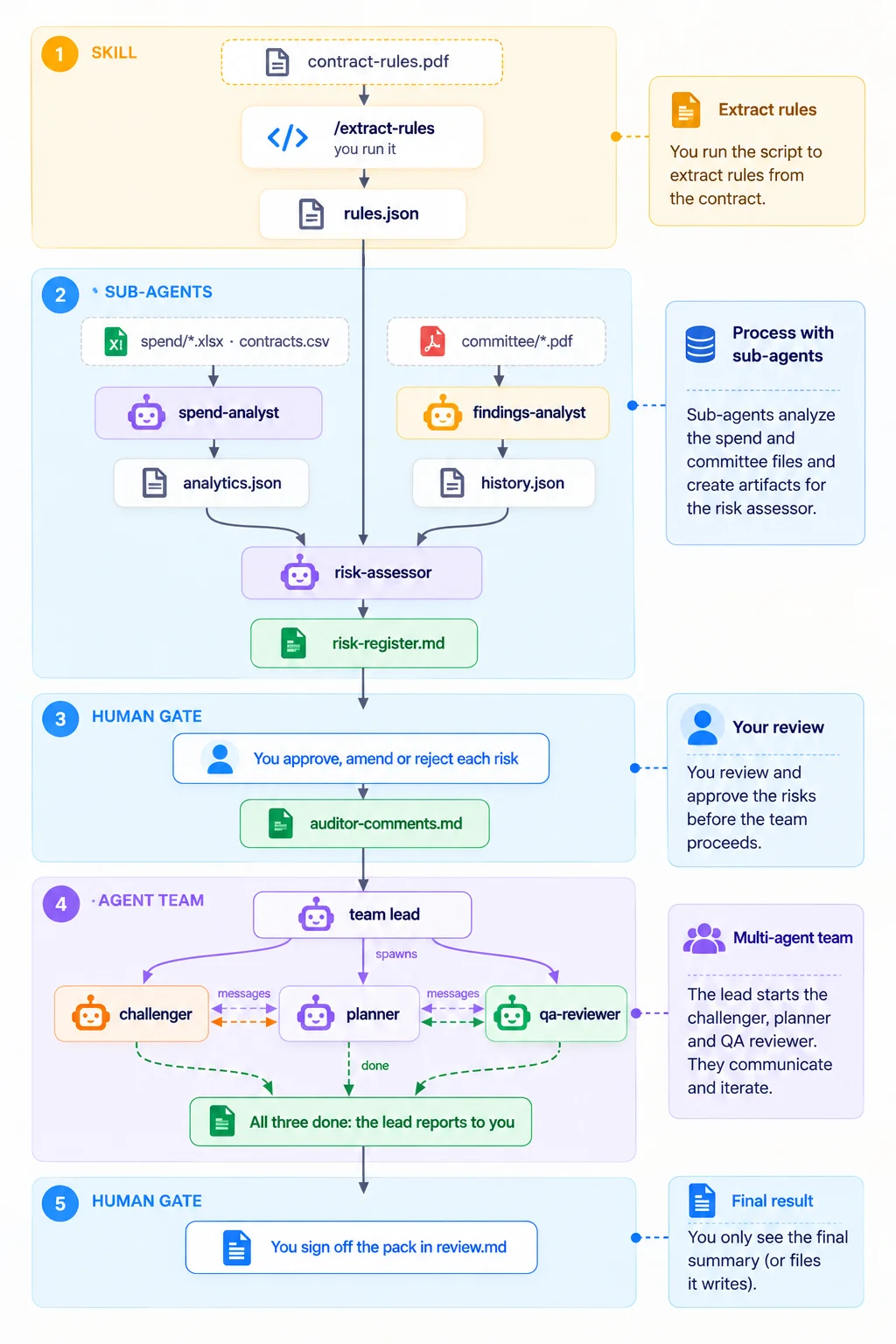
Four stages, each producing files that the next stage reads.
- 1Skillextract-rules
Contract Rules PDFproduces
rules.jsonEvery testable rule, with a verified verbatim quote.
- 2Sub-agentsspend-analyst · findings-analyst · risk-assessor
Spend files, Contracts Finder, committee papers and the rulesproduces
risk-register.mdIndicators computed by Python, past audit opinions on record, and rated risks that each cite a rule, a metric or an audit item.
- 3Youthe auditor
The registerproduces
auditor-comments.mdApprove, amend or reject each risk.
- 4Agent teamplanner · challenger · qa-reviewer
The approved risks, the rules and the analyticsproduces
audit-program.mdA planning memo, a risk-control matrix and an audit program with the exact payments to pull, challenged by a second agent and checked by four scripts before you sign off.
The rules it follows
- The model reads and judges; Python computes every number.
- Everything is traceable. Quotes are verified against the PDF, and every figure comes from a named script.
- Indicators, not accusations. This is real council data, so outputs describe patterns to investigate.
- Missing input means stop and report. Nothing is guessed or made up.
How each lesson works
- Each step explains why it matters, then gives you a prompt with a copy button. Two setup steps, making the folder and adding the data, are done in VS Code and your browser instead.
- Paste each prompt into Claude Code and let it work. Approve its permission requests as they come up.
- Compare what happens with the “What to expect” list. Some steps include a replay from a real run.
- Tick each step when it's done. Progress is kept in this browser only.
- Each lesson ends with a short check on the design ideas behind it.
Before you start
- You need VS Code and Claude Code. The setup lesson starts with installing both, then making the project folder and downloading the data.
- Allow about half a day. The agents take several minutes each to run.
- The data is public, but it is real. Treat every result as an indicator to investigate, and don't share flagged payments out of context.